> For the complete documentation index, see [llms.txt](https://docs.raybot.app/start/llms.txt). Markdown versions of documentation pages are available by appending `.md` to page URLs; this page is available as [Markdown](https://docs.raybot.app/start/dev/api.md).
# API
The RayBot API provides programmatic access to wallet management . This documentation covers all public-facing endpoints, authentication, rate limits, and usage examples.
### 🌐 Base URL
All requests are made to:
```agda
https://webapi.raybot.app
```
***
## 🔐 Authentication
### Getting an API Key
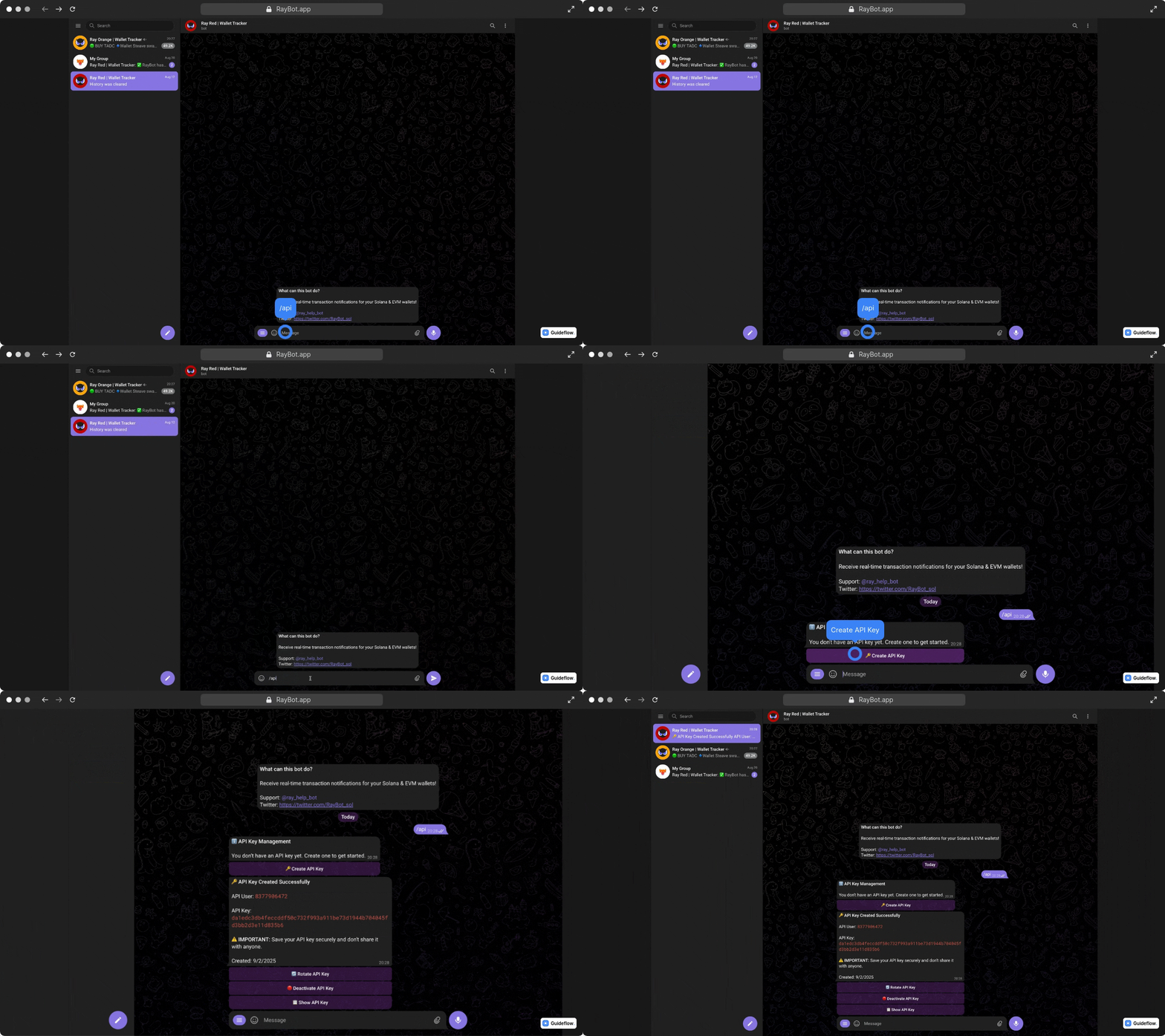
You can obtain an API key directly in the RayBot Telegram Bot by sending the command:
```
/api
```
📍Example
***
### Required Parameters
> All requests to **`/publicapi`** must include your API user id and API key:
>
> * `X-API-User` header (or `api_user` query parameter): — Your API user id
> * `X-API-Key` header (or `token` query parameter): — Your API key
***
### Data Format
Send the credentials as headers (recommended), so the API key does not appear in URLs and logs:
```bash
curl https://webapi.raybot.app/publicapi/destinations \
-H "X-API-User: your_user_id" \
-H "X-API-Key: your_api_key"
```
Query parameters are still supported. If both are sent, the headers are used.
```atom
GET /publicapi/wallets?api_user=your_user_id&token=your_api_key
```
***
### Rate Limits
**Public API endpoints (**`/publicapi`**)**: — 5 requests per 10 seconds
***
### Bot numbers
With each request, you need to specify a Telegram bot number. Use the table below to find the correct bot:
Ray Bots:
```
0: @solana_notify_bot
1: @ray_purple_bot
2: @ray_red_bot
3: @ray_blue_bot
4: @ray_gold_bot
5: @ray_silver_bot
6: @ray_black_bot
7: @ray_ruby_bot
8: @ray_sapphire_bot
9: @ray_pearl_bot
10: @ray_green_bot
11: @ray_yellow_bot
12: @ray_opal_bot
13: @ray_diamond_bot
14: @ray_emerald_bot
15: @ray_topaz_bot
16: @ray_cyan_bot
17: @ray_orange_bot
18: @ray_adamite_bot
19: @ray_amber_bot
20: @ray_onyx_bot
21: @ray_quartz_bot
22: @ray_obsidian_bot
23: @ray_nephrite_bot
24: @ray_moonstone_bot
25: @ray_agate_bot
26: @ray_azure_bot
27: @ray_magenta_bot
28: @ray_lime_bot
29: @ray_olive_bot
30: @ray_aqua_bot
31: @ray_bronze_bot
32: @ray_violet_bot
33: @ray_khaki_bot
```
***
## 📋 Endpoints
### **Get Destinations**
**Endpoint:** `GET /publicapi/destinations`
Returns all owned, non-deleted destinations in one response, without pagination. Destination IDs are strings; use them in the settings paths below or as `user_id` in wallet request bodies.
**Parameters:** none besides the [API credentials](#required-parameters).
**Response:**
```json
{
"status": "ok",
"destinations": [
{
"destination_id": "123456789",
"name": "alice",
"type": "telegram_dm",
"bot_names": ["@solana_notify_bot"]
}
]
}
```
| `type` | Destination |
| -------------------------- | ----------------------------------------------------------------------- |
| `telegram_dm` | Your private chat with a public RayBot Telegram bot. |
| `telegram_group` | A Telegram group or supergroup connected to a public RayBot bot. |
| `telegram_dedicated_bot` | A private chat with your dedicated Telegram bot. |
| `telegram_dedicated_group` | A Telegram group or supergroup connected to your dedicated bot. |
| `discord_dm` | Direct messages to your personal Discord account. |
| `discord_channel` | A channel in a Discord server connected through the RayBot Discord bot. |
| `discord_webhook` | A Discord channel receiving alerts through an incoming Discord webhook. |
| `webhook` | Your HTTP endpoint receiving alerts through a custom webhook. |
`bot_names` is returned only for Telegram types and may be empty. Dedicated groups use their accessible parent bot’s username.
***
### **Get Destination Settings**
**Endpoint:** `GET /publicapi/destinations/:destination_id/settings`
**Parameters:**
| Parameter | Location | Type | Required / values |
| ---------------- | -------- | ----------------- | --------------------------------------------------------------------------------------------------------------------------- |
| `destination_id` | Path | string | Required; owned, non-deleted destination ID |
| `bot` | Query | integer or string | Required for `telegram_dm`; omit for every other type. Registered public bot ID or alias, e.g. `0`, `onyx`, `@ray_onyx_bot` |
**Response:**
```json
{
"status": "ok",
"destination_id": "123456789",
"type": "telegram_dm",
"bot": 0,
"settings": {
"buys": true,
"min_usd": 25,
"button_based2": true
}
}
```
`bot` is absent for other destination types. Only saved, supported settings are returned; runtime defaults are omitted. For `telegram_dm`, filters use the selected bot's saved object, or the main filter if no bot filter exists. Buttons and links use shared destination settings.
***
### **Update Destination Settings**
**Endpoint:** `POST /publicapi/destinations/:destination_id/settings`
**Path and query parameters:** same as Get Destination Settings.
**JSON body:** `settings` — required, non-empty object using the fields below.
```json
{
"settings": {
"buys": true,
"min_usd": 25,
"button_based2": true,
"burst_window_seconds": 20
}
}
```
**Response:** same shape as Get Destination Settings, with saved settings after the update.
Unknown fields or invalid values reject the whole patch. Direction pairs (`in_txs`/`out_txs`, `evm_in_txs`/`evm_out_txs`) cannot both be disabled by an update. Unsubmitted values are preserved.
**Status codes:** `200` success; `400` invalid input or missing credentials; `401` invalid API key; `404` inaccessible destination or unregistered bot; `429` rate limit exceeded. Settings reads use the same codes.
**Supported destination `settings` fields:**
Use these public field names in the POST `settings` object. GET returns the same names. Boolean fields accept `true`/`false` or `0`/`1` on writes and return `true`/`false` on reads. Only the fields listed below are supported; client-specific buttons and bot-only UI state are excluded.
Shared transaction controls
| Public field | Accepted type / value | Meaning |
| ------------ | --------------------- | ---------------------------------------------- |
| `approvals` | boolean | Include token approval alerts on EVM and TRON. |
Solana transactions and amounts
| Public field | Accepted type / value | Meaning |
| --------------------- | --------------------- | ----------------------------------------------------------------------------------- |
| `nfts` | boolean | Include NFT activity alerts. |
| `swaps` | boolean | Include token-to-token swaps. |
| `buys` | boolean | Include token purchases paid with SOL or a supported stablecoin. |
| `sells` | boolean | Include token sales for SOL or a supported stablecoin. |
| `transfers` | boolean | Include SOL transfers. |
| `in_txs` | boolean | Include incoming Solana transactions. |
| `out_txs` | boolean | Include outgoing Solana transactions. |
| `other` | boolean | Include activity classified as other. |
| `token_transfers` | boolean | Include token transfers other than stablecoin-only transfers. |
| `usd_transfers` | boolean | Include stablecoin-only transfers. |
| `burn` | boolean | Include token burn alerts. |
| `cnfts` | boolean | Include compressed NFT activity alerts. |
| `jito_tip` | boolean | Include Jito tip alerts. |
| `unknown` | boolean | Include activity that could not be classified. |
| `associated_token` | boolean | Include associated token account creation alerts. |
| `close_token_account` | boolean | Include token account closure alerts. |
| `add_liquidity` | boolean | Include liquidity additions. |
| `remove_liquidity` | boolean | Include liquidity removals. |
| `claim_fees` | boolean | Include fee claims. |
| `token_mint` | boolean | Include token minting alerts. |
| `migrate` | boolean | Include token migration alerts. |
| `min_sol` | number ≥ 0 | Minimum SOL transfer amount, in SOL. |
| `max_sol` | number ≥ 0 | Maximum SOL transfer amount, in SOL. 0 disables the upper limit. |
| `min_usd` | number ≥ 0 | Minimum token transfer value, in USD. |
| `max_usd` | number ≥ 0 | Maximum token transfer value, in USD. 0 disables the upper limit. |
| `min_trade_sol` | number ≥ 0 | Minimum trade amount, in SOL. |
| `max_trade_sol` | number ≥ 0 | Maximum trade amount, in SOL. 0 disables the upper limit. |
| `min_trade_usd_mc` | number ≥ 0 | Minimum token market capitalization for trades, in USD. |
| `max_trade_usd_mc` | number ≥ 0 | Maximum token market capitalization for trades, in USD. 0 disables the upper limit. |
| `distribute_fees` | boolean | Include fee receipts. |
| `update_fees` | boolean | Include fee configuration updates. |
| `claim_cashback` | boolean | Include cashback claims. |
| `rewards` | boolean | Include reward distributions. |
| `freeze` | boolean | Include token freeze activity. |
| `min_other_usd` | number ≥ 0 | Minimum value of other activity, in USD. |
| `max_other_usd` | number ≥ 0 | Maximum value of other activity, in USD. 0 disables the upper limit. |
Solana protocols
| Public field | Accepted type / value | Meaning |
| --------------- | --------------------- | ----------------------------------------------------- |
| `drip` | boolean | Include DRiP activity alerts. |
| `jup_dca` | boolean | Include Jupiter dollar-cost averaging (DCA) activity. |
| `jup_limit` | boolean | Include Jupiter limit order activity. |
| `jupiter` | boolean | Include Jupiter activity. |
| `jupiter_perps` | boolean | Include Jupiter perpetual futures activity. |
| `meteora` | boolean | Include Meteora activity. |
| `pumpfun` | boolean | Include Pump.fun activity. |
| `pumpswap` | boolean | Include PumpSwap activity. |
| `raydium` | boolean | Include Raydium activity. |
| `streamflow` | boolean | Include Streamflow activity. |
| `orca` | boolean | Include Orca activity. |
Solana advanced filters
| Public field | Accepted type / value | Meaning |
| ----------------------- | --------------------- | -------------------------------------------------------------------------------------- |
| `first_buy_only` | boolean | Notify only on a wallet’s first buy of a token. |
| `first_sell_only` | boolean | Notify only on a wallet’s first sell of a token. |
| `new_transfers_only` | boolean | Include only transfers marked as new to the recipient. |
| `in_low_lq_transfers` | boolean | Include incoming transfers of low-liquidity tokens. |
| `likely_scam_transfers` | boolean | Saved preference for likely scam transfers; its filtering check is currently inactive. |
| `multi_transfers` | boolean | Include transactions containing multiple token transfers. |
| `multi_transfers_ex` | boolean | Include transactions containing multiple SOL or stablecoin transfers. |
| `spam` | boolean | Include activity classified as spam. |
| `min_token_age` | number ≥ 0 | Minimum token age for buy/sell alerts, in hours. |
| `max_token_age` | number ≥ 0 | Maximum token age for buy/sell alerts, in hours. 0 disables the upper limit. |
| `referral_transactions` | boolean | Include referral-source transfers and referral fee receipts. |
| `fomo_bridge` | boolean | Include Solana bridge legs identified as FOMO or Pump activity. |
| `maker_trades_only` | boolean | Include only trades where the tracked wallet is the maker. |
| `sol_stable_trades` | boolean | Include trades between SOL and supported stablecoins. |
| `failed_transactions` | boolean | Include failed transaction alerts. |
| `buy_cooldown_hours` | number ≥ 0 | Minimum hours between repeated buy alerts for the same wallet and token. |
| `sell_cooldown_hours` | number ≥ 0 | Minimum hours between repeated sell alerts for the same wallet and token. |
| `min_wallet_age_days` | number ≥ 0 | Minimum tracked wallet age since funding, in days. |
| `max_wallet_age_days` | number ≥ 0 | Maximum tracked wallet age since funding, in days. 0 disables the upper limit. |
EVM transactions and filters
| Public field | Accepted type / value | Meaning |
| ------------------------- | --------------------- | ----------------------------------------------------------------------------------- |
| `evm_swaps` | boolean | Include EVM token swaps. |
| `evm_buys` | boolean | Include EVM token purchases. |
| `evm_sells` | boolean | Include EVM token sales. |
| `evm_transfers` | boolean | Include EVM native token transfers. |
| `evm_token_transfers` | boolean | Include EVM token transfers. |
| `evm_first_buy_only` | boolean | Notify only on a wallet’s first EVM buy of a token. |
| `evm_first_sell_only` | boolean | Notify only on a wallet’s first EVM sell of a token. |
| `evm_spam` | boolean | Include EVM activity classified as spam. |
| `evm_spoof` | boolean | Include EVM transfers classified as spoofed for the tracked wallet. |
| `evm_batch_transfers` | boolean | Include EVM batch transfers with 10 or more recipients. |
| `evm_other` | boolean | Include other EVM transaction activity. |
| `evm_tip` | boolean | Include EVM trading bot tips. |
| `evm_in_txs` | boolean | Include EVM incoming transactions. |
| `evm_out_txs` | boolean | Include EVM outgoing transactions. |
| `evm_trade_min` | number ≥ 0 | Minimum trade value, in USD. |
| `evm_trade_max` | number ≥ 0 | Maximum trade value, in USD. 0 disables the upper limit. |
| `evm_mc_trade_min` | number ≥ 0 | Minimum token market capitalization for trades, in USD. |
| `evm_mc_trade_max` | number ≥ 0 | Maximum token market capitalization for trades, in USD. 0 disables the upper limit. |
| `evm_usd_min` | number ≥ 0 | Minimum transfer value, in USD. |
| `evm_usd_max` | number ≥ 0 | Maximum transfer value, in USD. 0 disables the upper limit. |
| `evm_token_mint` | boolean | Include EVM token minting. |
| `evm_burn` | boolean | Include EVM token burns. |
| `evm_add_liquidity` | boolean | Include EVM liquidity additions. |
| `evm_remove_liquidity` | boolean | Include EVM liquidity removals. |
| `evm_claim_fees` | boolean | Include EVM fee claims. |
| `evm_execute` | boolean | Include EVM contract execution activity. |
| `evm_nfts` | boolean | Include EVM NFT transfers. |
| `evm_polymarket` | boolean | Include EVM Polymarket activity. |
| `evm_buy_cooldown_hours` | number ≥ 0 | Minimum hours between repeated buy alerts for the same wallet and token. |
| `evm_sell_cooldown_hours` | number ≥ 0 | Minimum hours between repeated sell alerts for the same wallet and token. |
| `evm_token_age_min` | number ≥ 0 | Minimum token age for buy/sell alerts, in hours. |
| `evm_token_age_max` | number ≥ 0 | Maximum token age for buy/sell alerts, in hours. 0 disables the upper limit. |
EVM native transfer limits
| Public field | Accepted type / value | Meaning |
| ---------------------- | --------------------- | ----------------------------------------------------------------------------------------------------------------------------------------------------------------------- |
| `evm_native_min` | number ≥ 0 or null | Minimum native transfer amount for all EVM networks (unless overridden per chain), in native token units; null removes the saved threshold. |
| `evm_native_max` | number ≥ 0 or null | Maximum native transfer amount for all EVM networks (unless overridden per chain), in native token units; null removes the saved threshold. 0 disables the upper limit. |
| `base_native_min` | number ≥ 0 or null | Minimum native transfer amount for Base, in native token units; null removes the saved threshold. |
| `base_native_max` | number ≥ 0 or null | Maximum native transfer amount for Base, in native token units; null removes the saved threshold. 0 disables the upper limit. |
| `bsc_native_min` | number ≥ 0 or null | Minimum native transfer amount for BNB Smart Chain, in native token units; null removes the saved threshold. |
| `bsc_native_max` | number ≥ 0 or null | Maximum native transfer amount for BNB Smart Chain, in native token units; null removes the saved threshold. 0 disables the upper limit. |
| `ethereum_native_min` | number ≥ 0 or null | Minimum native transfer amount for Ethereum, in native token units; null removes the saved threshold. |
| `ethereum_native_max` | number ≥ 0 or null | Maximum native transfer amount for Ethereum, in native token units; null removes the saved threshold. 0 disables the upper limit. |
| `polygon_native_min` | number ≥ 0 or null | Minimum native transfer amount for Polygon, in native token units; null removes the saved threshold. |
| `polygon_native_max` | number ≥ 0 or null | Maximum native transfer amount for Polygon, in native token units; null removes the saved threshold. 0 disables the upper limit. |
| `avax_native_min` | number ≥ 0 or null | Minimum native transfer amount for Avalanche, in native token units; null removes the saved threshold. |
| `avax_native_max` | number ≥ 0 or null | Maximum native transfer amount for Avalanche, in native token units; null removes the saved threshold. 0 disables the upper limit. |
| `bera_native_min` | number ≥ 0 or null | Minimum native transfer amount for Berachain, in native token units; null removes the saved threshold. |
| `bera_native_max` | number ≥ 0 or null | Maximum native transfer amount for Berachain, in native token units; null removes the saved threshold. 0 disables the upper limit. |
| `hyperevm_native_min` | number ≥ 0 or null | Minimum native transfer amount for HyperEVM, in native token units; null removes the saved threshold. |
| `hyperevm_native_max` | number ≥ 0 or null | Maximum native transfer amount for HyperEVM, in native token units; null removes the saved threshold. 0 disables the upper limit. |
| `story_native_min` | number ≥ 0 or null | Minimum native transfer amount for Story, in native token units; null removes the saved threshold. |
| `story_native_max` | number ≥ 0 or null | Maximum native transfer amount for Story, in native token units; null removes the saved threshold. 0 disables the upper limit. |
| `arbitrum_native_min` | number ≥ 0 or null | Minimum native transfer amount for Arbitrum, in native token units; null removes the saved threshold. |
| `arbitrum_native_max` | number ≥ 0 or null | Maximum native transfer amount for Arbitrum, in native token units; null removes the saved threshold. 0 disables the upper limit. |
| `plasma_native_min` | number ≥ 0 or null | Minimum native transfer amount for Plasma, in native token units; null removes the saved threshold. |
| `plasma_native_max` | number ≥ 0 or null | Maximum native transfer amount for Plasma, in native token units; null removes the saved threshold. 0 disables the upper limit. |
| `mantle_native_min` | number ≥ 0 or null | Minimum native transfer amount for Mantle, in native token units; null removes the saved threshold. |
| `mantle_native_max` | number ≥ 0 or null | Maximum native transfer amount for Mantle, in native token units; null removes the saved threshold. 0 disables the upper limit. |
| `monad_native_min` | number ≥ 0 or null | Minimum native transfer amount for Monad, in native token units; null removes the saved threshold. |
| `monad_native_max` | number ≥ 0 or null | Maximum native transfer amount for Monad, in native token units; null removes the saved threshold. 0 disables the upper limit. |
| `megaeth_native_min` | number ≥ 0 or null | Minimum native transfer amount for MegaETH, in native token units; null removes the saved threshold. |
| `megaeth_native_max` | number ≥ 0 or null | Maximum native transfer amount for MegaETH, in native token units; null removes the saved threshold. 0 disables the upper limit. |
| `robinhood_native_min` | number ≥ 0 or null | Minimum native transfer amount for Robinhood Chain, in native token units; null removes the saved threshold. |
| `robinhood_native_max` | number ≥ 0 or null | Maximum native transfer amount for Robinhood Chain, in native token units; null removes the saved threshold. 0 disables the upper limit. |
| `stable_native_min` | number ≥ 0 or null | Minimum native transfer amount for Stable, in native token units; null removes the saved threshold. |
| `stable_native_max` | number ≥ 0 or null | Maximum native transfer amount for Stable, in native token units; null removes the saved threshold. 0 disables the upper limit. |
| `arc_native_min` | number ≥ 0 or null | Minimum native transfer amount for Arc, in native token units; null removes the saved threshold. |
| `arc_native_max` | number ≥ 0 or null | Maximum native transfer amount for Arc, in native token units; null removes the saved threshold. 0 disables the upper limit. |
| `ink_native_min` | number ≥ 0 or null | Minimum native transfer amount for Ink, in native token units; null removes the saved threshold. |
| `ink_native_max` | number ≥ 0 or null | Maximum native transfer amount for Ink, in native token units; null removes the saved threshold. 0 disables the upper limit. |
| `xlayer_native_min` | number ≥ 0 or null | Minimum native transfer amount for X Layer, in native token units; null removes the saved threshold. |
| `xlayer_native_max` | number ≥ 0 or null | Maximum native transfer amount for X Layer, in native token units; null removes the saved threshold. 0 disables the upper limit. |
TRON transactions and filters
| Public field | Accepted type / value | Meaning |
| ------------------- | --------------------- | ----------------------------------------------------------------------------------- |
| `tron_swaps` | boolean | Include TRON token swaps. |
| `tron_buys` | boolean | Include TRON token purchases. |
| `tron_sells` | boolean | Include TRON token sales. |
| `tron_transfers` | boolean | Include TRON native token transfers. |
| `tron_other` | boolean | Include other TRON transaction activity. |
| `tron_tip` | boolean | Include TRON trading bot tips. |
| `tron_trade_min` | number ≥ 0 | Minimum trade value, in USD. |
| `tron_trade_max` | number ≥ 0 | Maximum trade value, in USD. 0 disables the upper limit. |
| `tron_mc_trade_min` | number ≥ 0 | Minimum token market capitalization for trades, in USD. |
| `tron_mc_trade_max` | number ≥ 0 | Maximum token market capitalization for trades, in USD. 0 disables the upper limit. |
| `tron_usd_min` | number ≥ 0 | Minimum transfer value, in USD. |
| `tron_usd_max` | number ≥ 0 | Maximum transfer value, in USD. 0 disables the upper limit. |
TON transactions and filters
| Public field | Accepted type / value | Meaning |
| ------------------ | --------------------- | ----------------------------------------------------------- |
| `ton_swaps` | boolean | Include TON token swaps. |
| `ton_buys` | boolean | Include TON token purchases. |
| `ton_sells` | boolean | Include TON token sales. |
| `ton_transfers` | boolean | Include TON native token transfers. |
| `ton_other` | boolean | Include other TON transaction activity. |
| `ton_trade_min` | number ≥ 0 | Minimum trade value, in TON. |
| `ton_trade_max` | number ≥ 0 | Maximum trade value, in TON. 0 disables the upper limit. |
| `ton_transfer_min` | number ≥ 0 | Minimum transfer value, in TON. |
| `ton_transfer_max` | number ≥ 0 | Maximum transfer value, in TON. 0 disables the upper limit. |
Hyperliquid trades and orders
| Public field | Accepted type / value | Meaning |
| ----------------------------- | --------------------- | ------------------------------------------------------------------ |
| `hyperliquid_buys` | boolean | Include Hyperliquid spot buys. |
| `hyperliquid_sells` | boolean | Include Hyperliquid spot sells. |
| `hyperliquid_long` | boolean | Include Hyperliquid long position activity. |
| `hyperliquid_short` | boolean | Include Hyperliquid short position activity. |
| `hyperliquid_partial_fills` | boolean | Include partial order fills. |
| `hyperliquid_twap` | boolean | Include time-weighted average price (TWAP) order start/end alerts. |
| `hyperliquid_order_open` | boolean | Include newly placed orders. |
| `hyperliquid_order_triggered` | boolean | Include triggered take-profit and stop-loss orders. |
| `hyperliquid_order_canceled` | boolean | Include canceled orders. |
| `hyperliquid_trade_min` | number ≥ 0 | Minimum trade or order value, in USD. |
| `hyperliquid_trade_max` | number ≥ 0 | Maximum trade or order value, in USD. 0 disables the upper limit. |
Automatic wallet tracking
| Public field | Accepted type / value | Meaning |
| ------------ | --------------------- | ------------------------------------------ |
| `auto_add` | boolean | Automatically add new wallets to tracking. |
Burst protection and multi-wallet alerts
| Public field | Accepted type / value | Meaning |
| ----------------------- | ---------------------- | -------------------------------------------------------- |
| `burst_buy_alerts` | boolean | Enable burst protection for repeated buy alerts. |
| `burst_sell_alerts` | boolean | Enable burst protection for repeated sell alerts. |
| `burst_transfer_alerts` | boolean | Enable burst protection for repeated transfer alerts. |
| `burst_swap_alerts` | boolean | Enable burst protection for repeated swap alerts. |
| `show_non_multi_alerts` | boolean | Include standalone alerts alongside multi-wallet alerts. |
| `burst_window_seconds` | number: 10, 20, 30, 60 | Time window used by burst protection, in seconds. |
Trading buttons — Solana
| Public field | Accepted type / value | Meaning |
| ------------------------- | --------------------- | --------------------------------------------------- |
| `button_padre` | boolean | Show the Padre button in Solana alerts. |
| `button_axiom` | boolean | Show the Axiom button in Solana alerts. |
| `button_trojanweb` | boolean | Show the Trojan Web button in Solana alerts. |
| `button_trojandiomedes` | boolean | Show the Trojan (Diomedes) button in Solana alerts. |
| `button_bonkbot` | boolean | Show the BONKbot (Furiosa) button in Solana alerts. |
| `button_gmgn` | boolean | Show the GMGN button in Solana alerts. |
| `button_bloom` | boolean | Show the Bloom button in Solana alerts. |
| `button_photon` | boolean | Show the Photon button in Solana alerts. |
| `button_gmgnweb` | boolean | Show the GMGN Web button in Solana alerts. |
| `button_maestro` | boolean | Show the Maestro button in Solana alerts. |
| `button_trojan` | boolean | Show the Trojan (Hector) button in Solana alerts. |
| `button_trojannestor` | boolean | Show the Trojan (Nestor) button in Solana alerts. |
| `button_trojanhelenus` | boolean | Show the Trojan (Helenus) button in Solana alerts. |
| `button_bonkbotmonza` | boolean | Show the BONKbot (Monza) button in Solana alerts. |
| `button_telemetry` | boolean | Show the Telemetry button in Solana alerts. |
| `button_maestropro` | boolean | Show the Maestro Pro button in Solana alerts. |
| `button_nova` | boolean | Show the Nova button in Solana alerts. |
| `button_lute` | boolean | Show the Lute button in Solana alerts. |
| `button_soulsniper` | boolean | Show the SoulSniper button in Solana alerts. |
| `button_pepeboost` | boolean | Show the PepeBoost button in Solana alerts. |
| `button_ave` | boolean | Show the AVE button in Solana alerts. |
| `button_soltrading` | boolean | Show the SolTrading button in Solana alerts. |
| `button_soltradingasia` | boolean | Show the SolTrading Asia button in Solana alerts. |
| `button_soltradingbackup` | boolean | Show the SolTrading Backup button in Solana alerts. |
| `button_tradewiz` | boolean | Show the TradeWiz button in Solana alerts. |
| `button_fasol` | boolean | Show the Fasol button in Solana alerts. |
| `button_dogee` | boolean | Show the Dogee button in Solana alerts. |
| `button_blazing` | boolean | Show the Blazing button in Solana alerts. |
| `button_banana` | boolean | Show the BananaGun button in Solana alerts. |
| `button_based` | boolean | Show the Based button in Solana alerts. |
| `button_basedbot` | boolean | Show the BasedBot button in Solana alerts. |
| `button_basedvip` | boolean | Show the Based VIP button in Solana alerts. |
| `button_basedexcl` | boolean | Show the Based Exclusive button in Solana alerts. |
| `button_based2` | boolean | Show the Based2 button in Solana alerts. |
| `button_apepro` | boolean | Show the Ape Pro button in Solana alerts. |
| `button_ds` | boolean | Show the DexScreener button in Solana alerts. |
| `button_bpumpfun` | boolean | Show the Pump.fun button in Solana alerts. |
| `button_jupag` | boolean | Show the Jupiter Swap button in Solana alerts. |
| `button_juppro` | boolean | Show the Jupiter Pro button in Solana alerts. |
| `button_cove` | boolean | Show the Cove button in Solana alerts. |
| `button_fomo` | boolean | Show the FOMO button in Solana alerts. |
| `button_bloomeu2` | boolean | Show the Bloom EU2 button in Solana alerts. |
| `button_bloomus1` | boolean | Show the Bloom US1 button in Solana alerts. |
| `button_mevx` | boolean | Show the MevX button in Solana alerts. |
| `button_mevxold` | boolean | Show the MevX (legacy) button in Solana alerts. |
| `button_mevxbot` | boolean | Show the MevX bot button in Solana alerts. |
Trading buttons — EVM
| Public field | Accepted type / value | Meaning |
| ----------------------- | --------------------- | ---------------------------------------------- |
| `button_evm_based` | boolean | Show the Based button in EVM alerts. |
| `button_evm_axiom` | boolean | Show the Axiom button in EVM alerts. |
| `button_evm_maestro` | boolean | Show the Maestro button in EVM alerts. |
| `button_evm_sigma` | boolean | Show the Sigma button in EVM alerts. |
| `button_evm_bloom` | boolean | Show the Bloom button in EVM alerts. |
| `button_evm_gmgn` | boolean | Show the GMGN button in EVM alerts. |
| `button_evm_photon` | boolean | Show the Photon button in EVM alerts. |
| `button_evm_banana` | boolean | Show the BananaGun button in EVM alerts. |
| `button_evm_padre` | boolean | Show the Padre button in EVM alerts. |
| `button_evm_ds` | boolean | Show the DexScreener button in EVM alerts. |
| `button_evm_maestropro` | boolean | Show the Maestro Pro button in EVM alerts. |
| `button_evm_basedbot` | boolean | Show the BasedBot button in EVM alerts. |
| `button_evm_basedexcl` | boolean | Show the Based Exclusive button in EVM alerts. |
| `button_evm_basedvip` | boolean | Show the Based VIP button in EVM alerts. |
| `button_evm_basedvipeu` | boolean | Show the Based VIP EU button in EVM alerts. |
| `button_evm_sigma10` | boolean | Show the Sigma 10 button in EVM alerts. |
| `button_evm_sigmavip` | boolean | Show the Sigma VIP button in EVM alerts. |
| `button_evm_pepe` | boolean | Show the PepeBoost button in EVM alerts. |
| `button_evm_cove` | boolean | Show the Cove button in EVM alerts. |
| `button_evm_fomo` | boolean | Show the FOMO button in EVM alerts. |
| `button_evm_mevxbot` | boolean | Show the MevX bot button in EVM alerts. |
| `button_evm_mevx` | boolean | Show the MevX button in EVM alerts. |
| `button_evm_mevxold` | boolean | Show the MevX (legacy) button in EVM alerts. |
| `button_evm_based2` | boolean | Show the Based2 button in EVM alerts. |
| `button_evm_pumpfun` | boolean | Show the Pump.fun button in EVM alerts. |
Trading buttons — TRON
| Public field | Accepted type / value | Meaning |
| ------------------------ | --------------------- | ------------------------------------------- |
| `button_tron_maestro` | boolean | Show the Maestro button in TRON alerts. |
| `button_tron_maestropro` | boolean | Show the Maestro Pro button in TRON alerts. |
| `button_tron_gmgn` | boolean | Show the GMGN button in TRON alerts. |
| `button_tron_photon` | boolean | Show the Photon button in TRON alerts. |
Trading buttons — TON
| Public field | Accepted type / value | Meaning |
| ----------------------- | --------------------- | ------------------------------------------ |
| `button_ton_dtrade` | boolean | Show the DTrade button in TON alerts. |
| `button_ton_maestro` | boolean | Show the Maestro button in TON alerts. |
| `button_ton_maestropro` | boolean | Show the Maestro Pro button in TON alerts. |
Notification links — Solana / token information
| Public field | Accepted type / value | Meaning |
| ------------------- | --------------------- | ------------------------------------------------------------------- |
| `link_bullx` | boolean | Show the BullX link in Solana alerts. |
| `link_bullxneo` | boolean | Show the BullX NEO link in Solana alerts. |
| `link_bullxbackup` | boolean | Show the BullX Backup 1 link in Solana alerts. |
| `link_bullxbackup2` | boolean | Show the BullX Backup 2 link in Solana alerts. |
| `link_birdeye` | boolean | Show the Birdeye link in Solana alerts. |
| `link_gmgn` | boolean | Show the GMGN link in Solana alerts. |
| `link_rick` | boolean | Show the Rick link in Solana alerts. |
| `link_dexscreener` | boolean | Show the DexScreener link in Solana alerts. |
| `link_dexscreener2` | boolean | Show the DexScreener without a wallet filter link in Solana alerts. |
| `link_photon` | boolean | Show the Photon link in Solana alerts. |
| `link_telemetry` | boolean | Show the Telemetry link in Solana alerts. |
| `link_mevx` | boolean | Show the MevX link in Solana alerts. |
| `link_axiom` | boolean | Show the Axiom link in Solana alerts. |
| `link_padre` | boolean | Show the Padre link in Solana alerts. |
| `link_dextools` | boolean | Show the DexTools link in Solana alerts. |
| `link_defined` | boolean | Show the Defined.fi link in Solana alerts. |
| `link_defined_old` | boolean | Show the Un.Defined.fi link in Solana alerts. |
| `link_trojan` | boolean | Show the Trojan (Hector) link in Solana alerts. |
| `link_debot` | boolean | Show the Debot link in Solana alerts. |
| `link_based` | boolean | Show the Based link in Solana alerts. |
| `link_fomo` | boolean | Show the FOMO link in Solana alerts. |
| `link_pumpfun` | boolean | Show the Pump.fun link in Solana alerts. |
| `link_x` | boolean | Show the X search link in Solana alerts. |
| `link_token_info` | boolean | Show the token information link in alerts. |
Notification links — EVM
| Public field | Accepted type / value | Meaning |
| ---------------------- | --------------------- | ------------------------------------------ |
| `link_evm_dexscreener` | boolean | Show the DexScreener link in EVM alerts. |
| `link_evm_dextools` | boolean | Show the DexTools link in EVM alerts. |
| `link_evm_birdeye` | boolean | Show the Birdeye link in EVM alerts. |
| `link_evm_photon` | boolean | Show the Photon link in EVM alerts. |
| `link_evm_gmgn` | boolean | Show the GMGN link in EVM alerts. |
| `link_evm_defined` | boolean | Show the Defined.fi link in EVM alerts. |
| `link_evm_defined_old` | boolean | Show the Un.Defined.fi link in EVM alerts. |
| `link_evm_rick` | boolean | Show the Rick link in EVM alerts. |
| `link_evm_binance` | boolean | Show the Binance link in EVM alerts. |
| `link_evm_axiom` | boolean | Show the Axiom link in EVM alerts. |
| `link_evm_based` | boolean | Show the Based link in EVM alerts. |
| `link_evm_fomo` | boolean | Show the FOMO link in EVM alerts. |
| `link_evm_padre` | boolean | Show the Padre link in EVM alerts. |
| `link_evm_debot` | boolean | Show the Debot link in EVM alerts. |
| `link_evm_x` | boolean | Show the X search link in EVM alerts. |
Notification links — TRON
| Public field | Accepted type / value | Meaning |
| ----------------------- | --------------------- | ----------------------------------------- |
| `link_tron_dexscreener` | boolean | Show the DexScreener link in TRON alerts. |
| `link_tron_dextools` | boolean | Show the DexTools link in TRON alerts. |
| `link_tron_avedex` | boolean | Show the AveDEX link in TRON alerts. |
***
### **Add Wallets**
**Endpoint:** `POST /publicapi/wallets/add`
Add multiple wallets to a user's bot configuration.
#### **Parameters:**
> **Query Parameters:**
>
> * `api_user` (string, required unless sent as the `X-API-User` header): Your API user ID
> * `token` (string, required unless sent as the `X-API-Key` header): API authentication token
**Request Body:**
```json
{
"user_id": "string",
"bot": 1,
"wallets": [
{
"wallet_address": "string",
"wallet_name": "string (optional)"
},
{
"wallet_address": "string",
"wallet_name": "string (optional)"
},
...
]
}
```
> **Validation Rules:**
>
> * Maximum 10 wallets per request
> * `wallet_address` must be alphanumeric
> * `bot` must be a bot number from the [Bot numbers](#bot-numbers) table (0-33)
> * `wallets` array must contain 1-10 items
**Response:**
```json
{
"status": "ok" | "error",
"wallets": [
{
"address": "string",
"type": "solana" | "evm",
"status": "active" | "limit" | "user_pause",
"wallet_name": "string",
"bot": 1
}
]
}
```
> **Status Codes**
>
> * `201`: Wallets added successfully
> * `400`: Invalid request data
> * `401`: Invalid authentication
> * `403`: User not authorized
> * `429`: Rate limit exceeded
***
### **Delete Wallets**
**Endpoint:** `POST /publicapi/wallets/delete`
**Parameters:**
> **Query Parameters:**
>
> * `api_user` (string, required unless sent as the `X-API-User` header): Your API user ID
> * `token` (string, required unless sent as the `X-API-Key` header): API authentication token
**Request Body:**
```json
{
"wallets": ["wallet_address_1", "wallet_address_2"],
"user_id": "string",
"bot": 1
}
```
> **Validation Rules:**
>
> * `wallets` must be a non-empty array
> * Each wallet address must be valid Solana, EVM, or TRON address
> * `bot` is an optional integer filter, including a dedicated bot ID returned by wallet reads. Omit `bot` to include all bots.
**Response:**
```json
{
"status": "ok",
"deletedCount": 2
}
```
> **Status Codes:**
>
> * `200`: Wallets deleted successfully
> * `400`: Invalid wallet addresses
> * `401`: Invalid authentication
> * `404`: No wallets found
> * `429`: Rate limit exceeded
***
### **Get Wallets (paginated)**
**Endpoint:** `POST /publicapi/wallets/show`
Retrieve all wallets for the authenticated user, with optional filtering and pagination.
**Parameters:**
> **Query Parameters:**
>
> * `api_user` (string, required unless sent as the `X-API-User` header): Your API user ID
> * `token` (string, required unless sent as the `X-API-Key` header): API authentication token
**Request Body:**
```json
{
"page": 1,
"limit": 50,
"bot": 1,
"user_id": "string"
}
```
> **Validation Rules:**
>
> * `page` must be an integer (default: 1, min: 1)
> * `limit` (page size) must be an integer (default: 50, min: 1, max: 200)
> * `bot` is an optional integer filter, including a dedicated bot ID returned by wallet reads. Omit `bot` to include all bots.
**Response:**
```json
{
"status": "ok",
"wallets": [
{
"address": "string",
"type": "solana" | "evm",
"status": "active" | "user_pause" | "limit",
"wallet_name": "string",
"bot": 1,
"user_id": "string"
}
],
"page": 1,
"limit": 50,
"total": 123,
"totalPages": 3,
"nextPage": 2,
"prevPage": null
}
```
> **Status Codes:**
>
> * `200`: Success
> * `401`: Invalid authentication
> * `429`: Rate limit exceeded
> * `400`: Validation error (missing/invalid params)
***
### **Update Wallet Settings**
**Endpoint:** `POST /publicapi/wallets/settings`
Update tx filter settings for a specific wallet that belongs to the authenticated admin (API user).
**Parameters:**
> **Query Parameters:**
>
> * `api_user` (string, required unless sent as the `X-API-User` header): Your API user ID
> * `token` (string, required unless sent as the `X-API-Key` header): API authentication token
**Request Body:**
```json
{
"bot": 1,
"user_id": "string",
"wallet_address": "string",
"settings": {
"[boolean_key]": true | false,
"[numeric_key]": 123.456
}
}
```
> **Validation Rules:**
>
> * `bot` must be a bot number from the [Bot numbers](#bot-numbers) table (0-33)
> * `wallet_address` must be a valid Solana / EVM / Tron address
> * `settings` must be an object
**Supported `settings` Keys**
Boolean Settings
Solana:
* `nfts`, `swaps`, `buys`, `sells`, `first_buy_only`, `first_sell_only`, `new_transfers_only`, `transfers`, `in_txs`, `out_txs`, `other`, `token_transfers`, `in_low_lq_transfers`, `likely_scam_transfers`, `multi_transfers`, `multi_transfers_ex`, `burn`, `drip`, `cnfts`, `jup_dca`, `jup_limit`, `jupiter`, `jupiter_perps`, `meteora`, `jito_tip`, `pumpfun`, `pumpswap`, `raydium`, `unknown`, `approvals`, `associated_token`, `close_token_account`, `add_liquidity`, `remove_liquidity`, `claim_fees`, `spam`, `token_mint`, `migrate`, `streamflow`
EVM:
* `evm_swaps`, `evm_buys`, `evm_sells`, `evm_transfers`, `evm_other`, `evm_tip`
TRON:
* `tron_swaps`, `tron_buys`, `tron_sells`, `tron_transfers`, `tron_other`, `tron_tip`
Numeric Settings
Solana:
* `min_sol`, `max_sol`, `min_usd`, `max_usd`, `min_trade_sol`, `max_trade_sol`, `min_trade_usd_mc`, `max_trade_usd_mc`, `min_token_age`, `max_token_age`
EVM:
* `evm_trade_min`, `evm_trade_max`, `evm_mc_trade_min`, `evm_mc_trade_max`, `evm_usd_min`, `evm_usd_max`
TRON:
* `tron_trade_min`, `tron_trade_max`, `tron_mc_trade_min`, `tron_mc_trade_max`, `tron_usd_min`, `tron_usd_max`
**Response:**
```json
{
"status": "ok",
"wallet": {
"address": "string",
"type": "solana" | "evm",
"status": "active" | "user_pause" | "limit",
"wallet_name": "string",
"bot": 1,
"user_id": "string",
"tx_filter": { // Full post-update filter map for this wallet
"...": "[current settings after update]"
}
},
"updated": 5 // Number of individual fields changed in this request
}
```
> **Status Codes:**
>
> * `200`: Success
> * `400`: Validation error (missing/invalid params)
> * `401`: Invalid authentication
> * `429`: Rate limit exceeded
***
## 🔧 SDKs and Examples
### **JavaScript/Node.js Example**
```javascript
const axios = require('axios');
const apiClient = axios.create({
baseURL: 'https://webapi.raybot.app',
timeout: 30000,
});
// Add wallets
async function addWallets(userId, token, wallets, bot = 1) {
try {
const response = await apiClient.post(
'/publicapi/wallets/add',
{
user_id: userId,
bot: bot,
wallets: wallets
},
{ headers: { 'X-API-User': userId, 'X-API-Key': token } }
);
return response.data;
} catch (error) {
console.error('Error adding wallets:', error.response?.data || error.message);
throw error;
}
}
// Usage examples
const wallets = [
{ wallet_address: 'ABC123...', wallet_name: 'My Wallet 1' },
{ wallet_address: 'DEF456...', wallet_name: 'My Wallet 2' }
];
addWallets('api_user_id', 'your_api_token', wallets)
.then(result => console.log('Wallets added:', result))
.catch(error => console.error('Failed to add wallets:', error));
```
### **Python Example**
```python
import requests
import json
class RayBotAPI:
def __init__(self, base_url, user_id, token):
self.base_url = base_url
self.user_id = user_id
self.token = token
def add_wallets(self, wallets, bot=1):
url = f"{self.base_url}/publicapi/wallets/add"
headers = {"X-API-User": self.user_id, "X-API-Key": self.token}
data = {
"user_id": self.user_id,
"bot": bot,
"wallets": wallets
}
response = requests.post(url, headers=headers, json=data)
response.raise_for_status()
return response.json()
# Usage
api = RayBotAPI("https://webapi.raybot.app", "api_user_id", "your_token")
wallets = [
{"wallet_address": "ABC123...", "wallet_name": "My Wallet 1"}
]
try:
result = api.add_wallets(wallets)
print(f"Added {len(result['wallets'])} wallets")
except requests.exceptions.HTTPError as e:
print(f"Error: {e.response.json()}")
```
---
# Agent Instructions
This documentation is published with GitBook. GitBook is the documentation platform designed so that both humans and AI agents can read, navigate, and reason over technical content effectively. Learn more at gitbook.com.
## Querying This Documentation
If you need additional information that is not directly available in this page, you can query the documentation by asking a question.
Perform an HTTP GET request on the following URL with the `ask` and `goal` query parameters:
```
GET https://docs.raybot.app/start/dev/api.md?ask=&goal=
```
`ask` is the immediate question: it should be specific, self-contained, and written in natural language.
`goal` is what the user is ultimately trying to achieve, the reason they need the answer. Sharing it helps GitBook give you a better, more relevant answer. A goal is most helpful when it describes the outcome the user wants rather than restating the question. For example, with `ask=how do I create an API token`, a goal like `automate deployments from our CI pipeline` lets GitBook tailor the answer to that use case.
The response will contain a direct answer to the question and relevant excerpts and sources from the documentation.
Use this mechanism when the answer is not explicitly present in the current page, you need clarification or additional context, or you want to retrieve related documentation sections.